
Note
Go to the end to download the full example code.
Measure noise of a FITS file#
Beginner’s tutorial showing how to measure the noise of a
MadcubaMap object. For a detailed overview go to the
documentation page.
First we read the FITS file as a MadcubaMap object.
from madcubapy.io import MadcubaMap

# Read fits file
madcuba_map = MadcubaMap.read(
    "../examples/data/IRAS16293_SO_2-1_moment0_madcuba.fits")
To measure the noise level of the map we have two options:
We can use the
measure_noise()function on theMadcubaMapobject to obtain the sigma value in a variable (this also works forCCDDataobjects):sigma = measure_noise(madcuba_map)
Or we can use the
MadcubaMap.update_sigma()method to automatically store the measured sigma value in the FITS header, on theSIGMAcard, and have it available for future analysis:madcuba_map.update_sigma()
Note
Remember that changes applied to a
MadcubaMapobject during a python run are not stored into the FITS file until the file is explicitly saved:madcuba_map.write("output_file.fits", overwrite=True)
How it works#
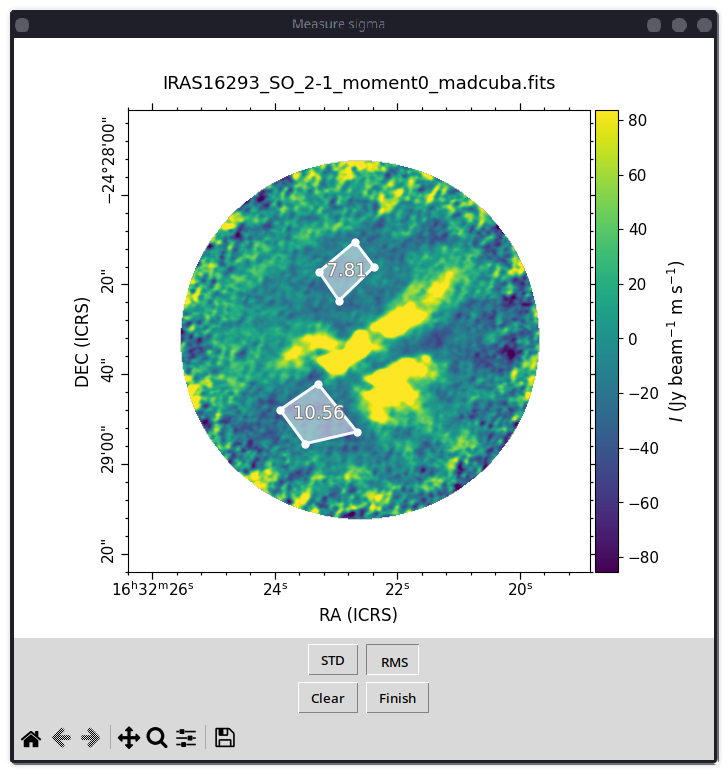
Both options behave in the same way. A window will appear where the user can select polygons using the mouse:
Left clicks create polygon vertices.
Right click closes the current polygon, and a subsequent left click starts a new polygon.
This window also offers buttons to change the statistic used to calculate the noise.
Once we have the desired polygons, we can press the Finish button to
close the window and return the noise value in a variable (the case of
measure_noise()) or stored in the FITS
header (the case of
MadcubaMap.update_sigma()).
Total running time of the script: (0 minutes 0.015 seconds)